TABLE OF CONTENTS
Overview
Enabling syslog forwarding from a Zimbra Collaboration Suite (ZCS) server to a SIEM is a critical step for centralized monitoring, security analytics, and compliance. This configuration enables visibility into security-relevant events such as failed authentication attempts, administrative actions, and mail routing anomalies.
This article explains how to forward:
- Standard system and Zimbra syslog events
- Application-specific Zimbra logs such as
audit.logandmailbox.log
Scope
- Zimbra Collaboration Suite (Network & Open Source Editions)
- Supported Linux platforms: RHEL, CentOS, Rocky Linux, Ubuntu
- Syslog daemon: rsyslog
Prerequisites
- Root or sudo access to the Zimbra server
- rsyslog installed and running
- CCE IP address and listening port (default: 514)
- Network connectivity between the Zimbra server and the CCE server
1. Identify Key Zimbra Log Files for SIEM Monitoring
Zimbra generates logs in two primary locations. For full visibility, both must be monitored.
| Log File | Location | Criticality | Description |
|---|---|---|---|
| zimbra.log | /var/log/zimbra.log | High | MTA (Postfix), Amavis (Antispam/AV), OpenLDAP, system-level Zimbra events |
| audit.log | /opt/zimbra/log/audit.log | High | Authentication attempts (success/failure), admin console actions, IMAP/POP access |
| mailbox.log | /opt/zimbra/log/mailbox.log | Medium | Java application logs, SOAP requests, backend mailbox operations |
| nginx.access.log | /opt/zimbra/log/nginx.access.log | Low–Medium | Webmail and proxy HTTP/HTTPS access logs |
2. Configure Syslog Forwarding Using rsyslog
Most Zimbra-supported Linux distributions use rsyslog. This section configures forwarding of system and Zimbra syslog events.
Note: Replace
<CCE IP>with your CCE server IP address and adjust the port if required.
Step A: Configure UDP or TCP Forwarding
Edit the main rsyslog configuration file:
sudo vi /etc/rsyslog.confAdd one of the following at the end of the file.
UDP (standard):
*.* @<CCE IP>:514TCP (recommended for reliability):
*.* @@<CCE IP>:514Optional: Forward Only Zimbra-Relevant Facilities
If you want to limit forwarding to Zimbra and security-related logs:
mail.* @@<CCE IP>:514
local0.* @@<CCE IP>:514
local1.* @@<CCE IP>:514
auth.* @@<CCE IP>:514
3. Monitor Zimbra Application Logs Using imfile
Zimbra’s audit.log and mailbox.log are written directly to disk by Java (Log4j) and are not forwarded via syslog by default. To capture these logs, rsyslog must monitor them using the imfile module.
Step A: Create imfile Configuration
Create a dedicated rsyslog configuration file:
sudo vi /etc/rsyslog.d/99-zimbra-siem.confAdd the following configuration:
# Load imfile module
module(load="imfile")

# Audit Log – Authentication & Admin Actions
input(type="imfile"
      File="/opt/zimbra/log/audit.log"
      Tag="zimbra_audit"
      Severity="info"
      Facility="local6")

# Mailbox Log – Application & Backend Logs
input(type="imfile"
      File="/opt/zimbra/log/mailbox.log"
      Tag="zimbra_mailbox"
      Severity="info"
      Facility="local6")

# Nginx Access Log – Webmail Access
input(type="imfile"
      File="/opt/zimbra/log/nginx.access.log"
      Tag="zimbra_nginx"
      Severity="info"
      Facility="local6")

# Forward monitored logs to SIEM
local6.* @@<CCE IP>:514
4. Update Zimbra Syslog Integration
Zimbra provides an internal utility to align its logging with the system syslog daemon.
Run the following as root:
/opt/zimbra/libexec/zmsyslogsetupRestart rsyslog to apply changes:
sudo systemctl restart rsyslog(Optional) Restart Zimbra services to refresh file handles:
su - zimbra -c "zmcontrol restart"
5. Verification
Generate Test Events
- Log in to the Zimbra Admin Console (updates
audit.log) - Send a test email (updates
/var/log/zimbra.log)
Validate Locally
Check for rsyslog errors:
tail -f /var/log/messagesor
tail -f /var/log/syslog
Verification on ADR UI
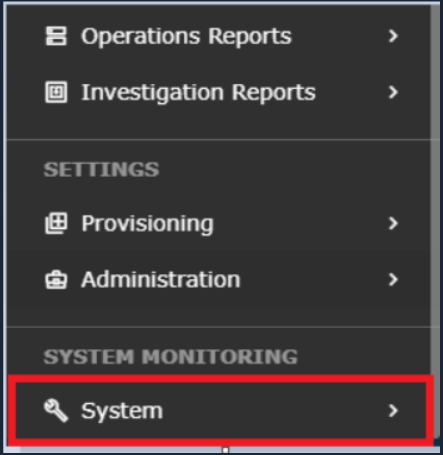
Log in to the UI >> System
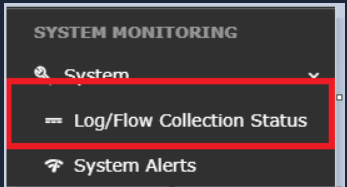
Go to Logs and Flows Collection Status.
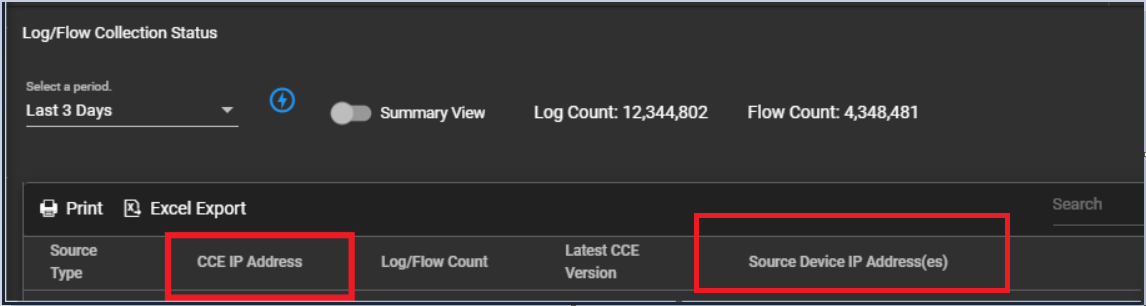
Under Source Device IP, the Zimbra server IP address will be listed.
6. Syslog Facility Reference
| Facility | Description |
|---|---|
| Postfix / MTA logs | |
| local0 | Zimbra main logger (zimbra.log) |
| local1 | Zimbra statistics |
| local6 | Custom facility for audit, mailbox, and nginx logs |
| auth | System authentication (SSH, sudo) |
Conclusion
By combining standard syslog forwarding with imfile-based monitoring, you achieve complete visibility into Zimbra’s operational and security events. This configuration ensures accurate detection of authentication failures, administrative changes, and mail flow anomalies within your SIEM.
Was this article helpful?
That’s Great!
Thank you for your feedback
Sorry! We couldn't be helpful
Thank you for your feedback
Feedback sent
We appreciate your effort and will try to fix the article