TABLE OF CONTENTS
Overview
We are providing you the steps to integrate your Aruba L2 Switch with ADR SIEM so that you can have Comprehensive visibility and Proactive Threat Detection in your Environment. There will be a log transfer between your firewall to CCE (Collection and Control Engine). In this document, we are guiding you through the steps for sflows forwarding.
Steps of Configuration
- Run this command:
configure t
- Run this command:
sflow 1 destination <CCE IP Address> 6343
- Run this command:
sflow 1 polling all 20000
- Run this command:
sflow 1 sampling all 120
- Run the exit command:
exit
- Run this command
display sflow
Verification (MSSP Only)
Verification can be done in two ways
On CCE
To check the sflows"
sudo tcpdump -i any port 6343 and host <Switch IP>
On UI
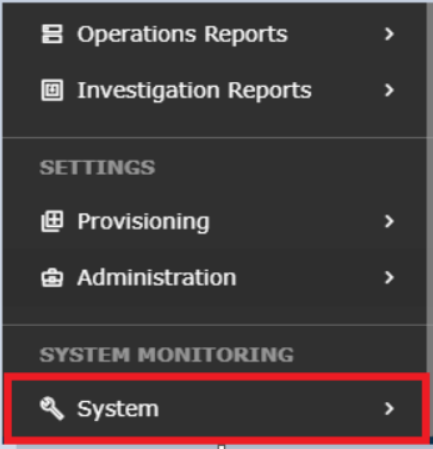
STEP1: Login to UI > SYSTEM> LOGS AND FLOWS COLLECTION STATUS.
STEP 2: > LOGS AND FLOWS COLLECTION STATUS.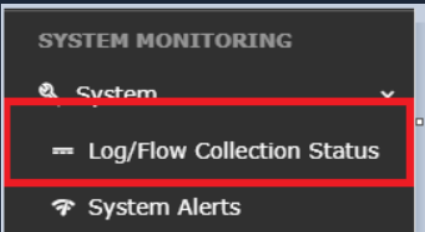
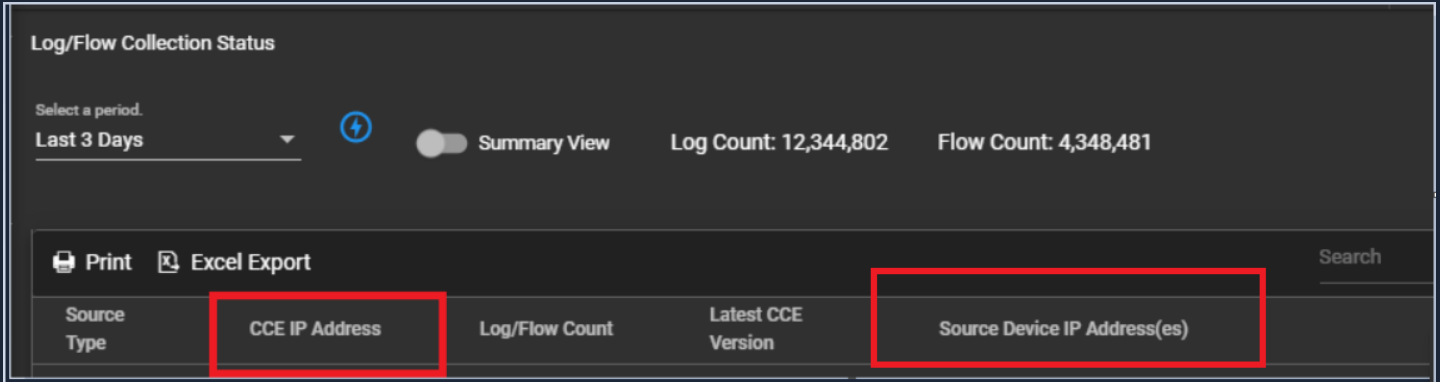
STEP 3: >Inside SOURCE DEVICE IP, the IP address will reflected.
Was this article helpful?
That’s Great!
Thank you for your feedback
Sorry! We couldn't be helpful
Thank you for your feedback
Feedback sent
We appreciate your effort and will try to fix the article