TABLE OF CONTENTS
Overview
Pulse Secure provides VPN security for enterprise environments, forwarding system and user activity logs for centralized analysis. This article details configuring Pulse Connect Secure (PCS) to forward logs to the ADR Collection and Control Engine (CCE) on UDP/TCP/TLS port 514. Proper log forwarding enables ADR SIEM (aiSIEM/aiXDR) to ingest events for threat detection and compliance monitoring.
Prerequisites
- Administrative access to the Pulse Secure admin console.
- ADR CCE server IP and user credentials.
- Network/firewall rules allowing outbound port 514 UDP from PCS to CCE.
Steps of Configuration
To configure reporting to a CCE server
- Login to the Pulse Secure platform with admin access.
- Select System > Log/Monitoring.
- Click the Settings tab to display the configuration page.
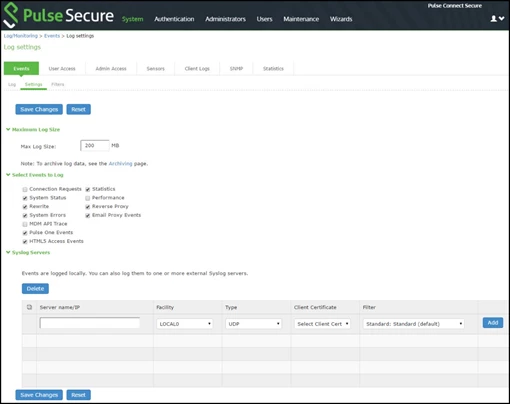
The image below shows the configuration page for Pulse Connect Secure. - Specify the maximum log size and select the events to be logged.
- Specify the CCE server configuration as described below. You can specify multiple CCE servers.
- Save the configuration.
Guidelines
- Server name/IP: Specify the fully qualified domain name or IP address for the CCE server.
NOTE: If you select TLS from the Type list, the server’s name must match the CN in the subject DN in the certificate obtained from the server. - Facility: Select a CCE server facility level (LOCAL0-LOCAL7).
Your CCE server must accept messages with the following settings: facility = LOG_USER and level = LOG_INFO. - Type: Select the connection type to the CCE server. You can select:
- UDP (User Datagram Protocol) - A simple non-secure transport model.
- TCP (Transmission Control Protocol) - A core protocol of the Internet Protocol suite (IP) but lacks strong security.
- TLS (Transport Layer Security) - Uses cryptographic protocols to provide a secure communication.
- Client Certificate (optional): If you select TLS from the Type menu and your remote CCE server requires client certificates, select the installed client certificate to use to authenticate to the CCE server. Client certificates are defined in the Configuration > Certificates > Client Auth Certificates page. Client certificates must be installed on the device before they can be used.
NOTE: There is no fallback if a connection type fails. - Filter: Select a filter format. Any custom filter format and the following predefined filter formats are available:
- Standard (default)—This log filter format logs the date, time, node, source IP address, user, realm, event ID, and message.
- WELF—This customized WebTrends Enhanced Log Format (WELF) filter combines the standard WELF format with information about the system realms, roles, and messages.
- WELF-SRC-2.0-Access Report—This filter adds access queries to the customized WELF filter. You can use this filter with NetIQ’s SRC to generate reports on user access methods.
Verification (MSSP Only)
On ADR SIEM UI
Log in to ADR SIEM UI.
Navigate: System → Logs and Flows Collection Status.
Confirm that Pulse Secure IP appears under Source Device IP.
On ADR CCE
Run:
sudo tcpdump -i any port 514 and host <Pulse_Secure_IP> -AAAYou should see syslog packets arriving from Pulse Secure.
Was this article helpful?
That’s Great!
Thank you for your feedback
Sorry! We couldn't be helpful
Thank you for your feedback
Feedback sent
We appreciate your effort and will try to fix the article