TABLE OF CONTENTS
Overview
FortiEDR provides multi-layered endpoint detection and response with both pre-infection and post-infection protection. It focuses not only on blocking advanced malware in real time but also on preventing data exfiltration and ransomware attacks after infiltration occurs.
A key feature is FortiEDR’s virtual patching, which blocks malicious outbound communications while allowing legitimate activities to continue, ensuring minimal business disruption even on compromised endpoints.
For integration with ADR (or other SIEM platforms), FortiEDR can be configured to export events via Syslog. This enables centralized monitoring, correlation, and alerting of endpoint activity.
Prerequisites
Before configuring FortiEDR with ADR:
FortiEDR Central Manager access with administrator privileges.
Syslog server details (IP address, protocol, port).
Ensure UDP/TCP port 514 is open between FortiEDR and the ADR CCE (Collector).
Root/admin access to the CCE for verification.
Configuration Steps
Step 1: Access Export Settings
Log in to the FortiEDR Central Manager Console.
Navigate to:
Administration > Export Settings.
Step 2: Define Syslog Destination
Click the “+” icon to define a new Syslog destination.
Enter the following details:
Syslog Server IP → ADR CCE IP address.
Protocol → Select UDP (default, port 514) or TCP/TLS if required.
Format → CEF (recommended for SIEM parsing).

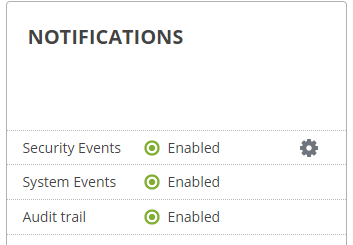
Step 3: Enable Notifications
Select the newly created syslog destination row.
In the Notifications pane, use the sliders to enable event forwarding.
Select the event categories you want forwarded (recommended: all security events).
Step 4: Select Fields to Export
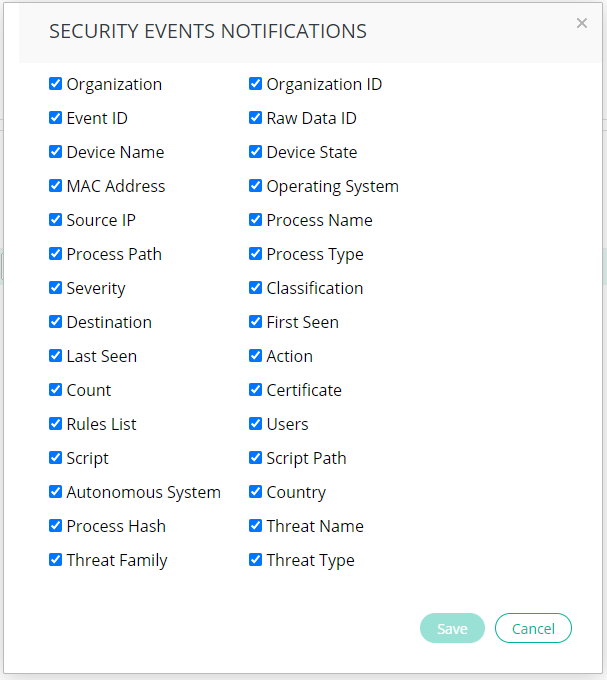
Click the “⋆” (star) button.
Check the boxes for fields to be included in the Syslog messages, such as:
Event ID
Raw Data ID
Source/Destination IP
Threat Type / Severity
Action Taken
Verification (MSSP Only)
From ADR UI
Log in to the ADR portal.
Navigate to:
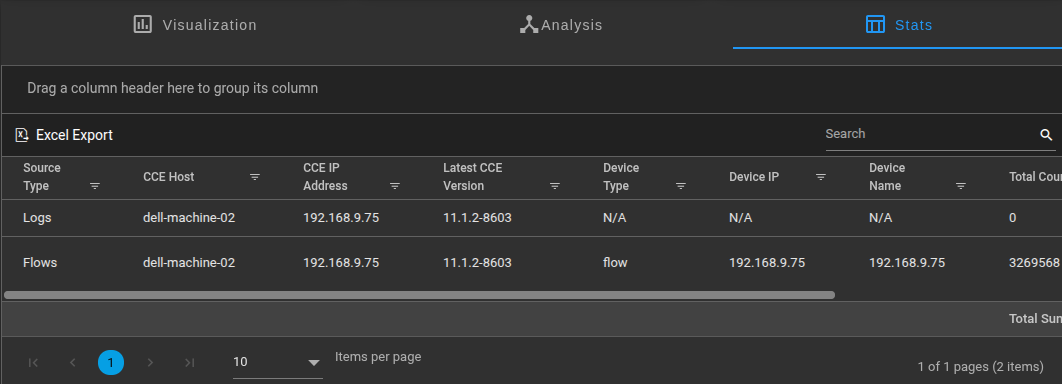
System > Logs and Flows Collection Status.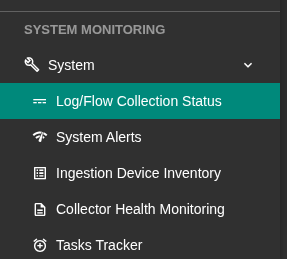
Confirm the FortiEDR Source Device IP is visible.
From CCE Server
Run the following command on the CCE to confirm logs are received:
sudo tcpdump -i any port 514 and host <FortiEDR_IP>
If logs are received, you will see Syslog messages streaming in.
If not, check firewall rules and syslog configuration in FortiEDR.
Reference -
https://docs.fortinet.com/document/fortiedr/6.2.0/administration-guide/109591/syslog
Was this article helpful?
That’s Great!
Thank you for your feedback
Sorry! We couldn't be helpful
Thank you for your feedback
Feedback sent
We appreciate your effort and will try to fix the article