TABLE OF CONTENTS
Overview
This guide describes how to securely configure Seqrite Endpoint Security to send data to ADR via the API for enhanced security monitoring and threat detection. Seqrite Endpoint Security (EPS) provides multiple methods to forward security logs to external systems for centralised monitoring, compliance, and analysis. Seqrite Endpoint Security can be integrated with ADR through an API connection, allowing centralised log collection and automated threat analysis.
Configuration Steps
In ADR UI
Navigate to Provisioning > Add-on Device.
Click the Add button to configure a new device entry.
For Device, select "Seqrite Endpoint Security".
Enter a Name for the device (customizable, for identification).
Enter the CCE Host IP address (where the SIEM will collect logs).
Provide the Access ID/User name and Password/Secret Key (these should be obtained from your Seqrite team).
In the JSON field, input the following (customise values as per your environment):
{"host": "x.x.x.x", "database_name": "db_name", "port_num": 423, "time_duration": 15, "procedure_call":{"dlp": "pro_dlp", "virus": "pro_virus", "web": "pro_web"}}host: Seqrite server's IP address
database_name: DB name containing endpoint logs
port_num: Log storage port
time_duration: Frequency (minutes) to pull logs
procedure_call: Procedures for DLP, virus, and web event extraction
Click Save to apply the configuration.
Verification (MSSP Only)
From ADR GUI Console
Log in with administrative rights.
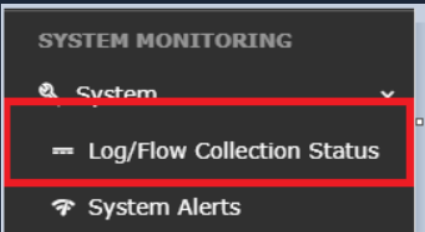
Go to System > Log/Flow Collection Status.
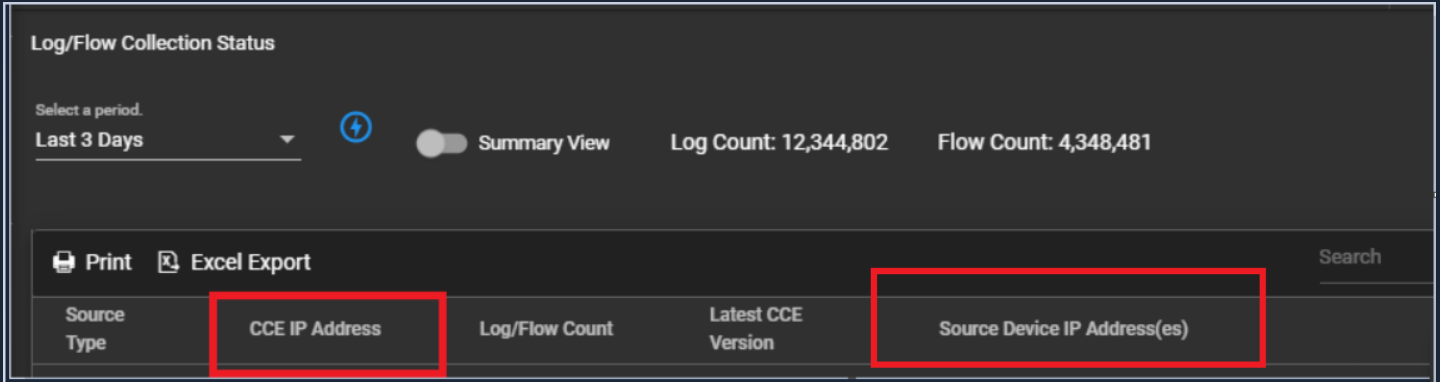
Ensure the add-on device status is reflected correctly. Confirm that logs from Seqrite Endpoint Security are collected and visible.
From CCE (Command-Line Verification)
Log in with the ADR user account.
Run:
otmdoc -m
Enter the add-on device container:
otmdoc -s cce-addon-devicesCheck scheduled tasks:
crontab -lRun the Seqrite Python script and review outputs.
Was this article helpful?
That’s Great!
Thank you for your feedback
Sorry! We couldn't be helpful
Thank you for your feedback
Feedback sent
We appreciate your effort and will try to fix the article