TABLE OF CONTENTS
- Prerequisite
- Enable Http Listener on CCE
- Generate API Token from Bitdefender GravityZone
- Configure Bitdefender GravityZone to send logs on CCE's Http Listener
Prerequisite
- Make sure these IPs are whitelisted on the firewall (Reference: https://www.bitdefender.com/business/support/en/77209-135319-setpusheventsettings.html)
34.159.83.241
34.159.47.15
34.159.150.228
34.85.152.87
34.85.155.173
- As CCE is on private network, we have to use Firewall Public IP. Therefore, the request will come on firewall's Public IP from Bitdefender GravityZone (from one of above whitelisted IPs) then will be forwarded to CCE IP on 63514 TCP port.
Enable Http Listener on CCE
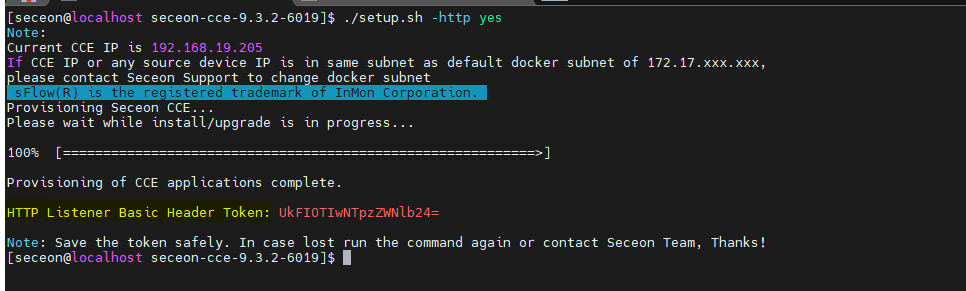
- Login to CCE machine, then go inside build directory and run ./setup.sh -http then provide yes to enable it.
- You will get one-time basic authorization header token for http listener copy it in a text file for future usage (As Example shown in below SS)
Generate API Token from Bitdefender GravityZone
- API credentials can be generated from MyAccount > Control Center API
- Copy the API Token and API URL both in a text file.
- On CCE run the following command echo -n '<api-token>: ' | base64 -w 0 to generate base64 encoded value of Bitdefender API Token (As Example shown in below SS) and save the output in a text for future usage.

Configure Bitdefender GravityZone to send logs on CCE's Http Listener
- Update the following command with correct details (i.e., bitdefender-api-host, BitDefenderGZ_Base64_Token, Firewall-Public-IP, and CCE_Authorization_Basic_Token) and execute it on CCE host to configure http listener details from Bitdefender GravityZone side -
curl -k -X POST \
https://bitdefender-api-host/api/v1.0/jsonrpc/push \
-H 'authorization: Basic BitDefenderGZ_Base64_Token' \
-H 'cache-control: no-cache' \
-H 'content-type: application/json' \
-d '{"params": {"status": 1, "serviceType": "cef", "serviceSettings": {"url": "https://Firewall-Public-IP:63514/api/bitdefender", "authorization": "Basic CCE_Authorization_Basic_Token", "requireValidSslCertificate": false}, "subscribeToEventTypes": {"hwid-change": true, "modules": true, "sva": true, "registration": true, "supa-update-status": true, "av": true, "aph": true, "fw": true, "avc": true, "uc": true, "dp": true, "device-control": true, "sva-load": true, "task-status": true, "exchange-malware": true, "network-sandboxing": true, "malware-outbreak": true, "adcloud": true, "exchange-user-credentials": true, "exchange-organization-info": true, "hd": true, "antiexploit": true} }, "jsonrpc": "2.0", "method": "setPushEventSettings", "id": "1"}' | jq- If configuration done successfully you can get JSON response as example shown in below SS

- To view the configuration, update the following command with correct details (i.e., bitdefender-api-host and BitDefenderGZ_Base64_Token) and run the following command you may see details in JSON -
curl -k -X POST https://bitdefender-api-host/api/v1.0/jsonrpc/push -H 'authorization: Basic BitDefenderGZ_Base64_Token' -H 'cache-control: no-cache' -H 'content-type: application/json' -d '{"params": {}, "jsonrpc": "2.0", "method": "getPushEventSettings", "id": "2"}' | jq- Once configuration done successfully then you may start getting logs.
- Verify on Logs/Flow Screen (as tag: bitdefendergz) or on Deep Tracker (as Source_data_type: Bitdefender GravityZone)
Was this article helpful?
That’s Great!
Thank you for your feedback
Sorry! We couldn't be helpful
Thank you for your feedback
Feedback sent
We appreciate your effort and will try to fix the article