TABLE OF CONTENTS
Overview
You can configure logging on your web server or website that records information about HTTP requests and errors. The information in your log can help you troubleshoot or optimize your website.
IIS provides a few settings for customizing your IIS log files within the IIS Manager console. You can log them in the default W3C format or use IIS, NCSA, or custom file formats.
You also have the ability to specify how the log files roll over. This determines if a new file is created hourly, daily, weekly, etc. You can also specify a max file size instead.
The fields that are being logged can also be customized. You may remove fields that you don’t need, select from some optional fields or even create your own. The custom fields should be values that are available in the HTTP headers or from the server variables
Steps of Configuration
Log into the IIS server.
Go to the IIS manager.
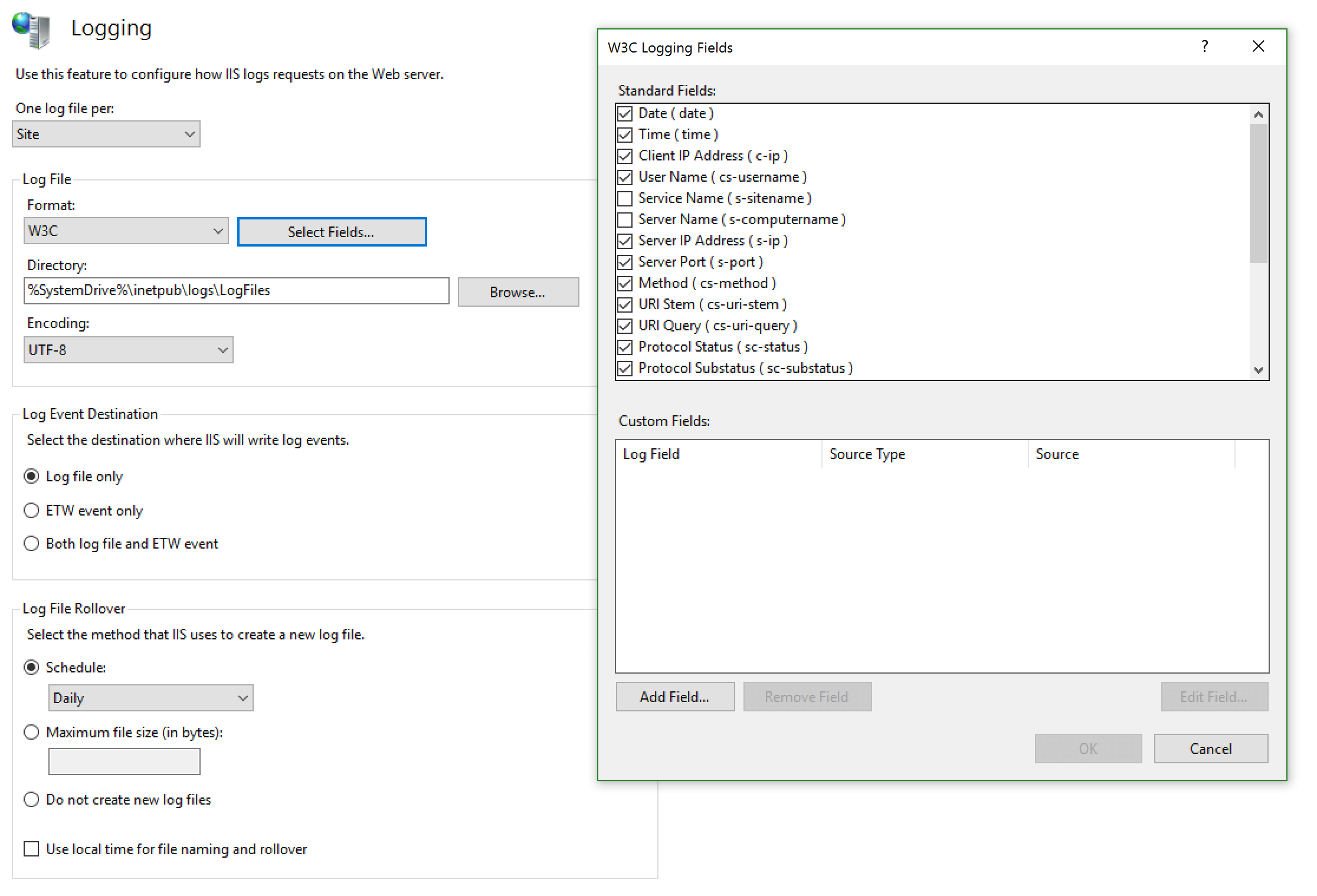
Get into "Logging" and set the parameters as shown in the image below:
Done!
Was this article helpful?
That’s Great!
Thank you for your feedback
Sorry! We couldn't be helpful
Thank you for your feedback
Feedback sent
We appreciate your effort and will try to fix the article