TABLE OF CONTENTS
Overview
Sometimes during the configuration of Window AD, the Local Security Policy is disabled. We can enable the Local Security Policy using Group Policy Management.
Steps to Enable Windows Event
- Go to Local Security Policy/Group management policy.
- Find Local Security Policy
- Go to "Local Policies" under "Security Settings" and select "Audit Policy":
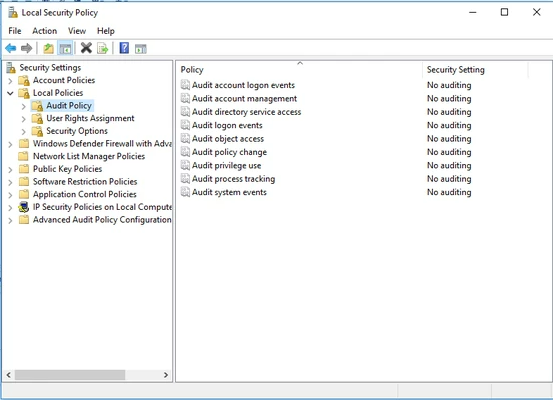
- Click on any of the events, say "Account Audit Logon":
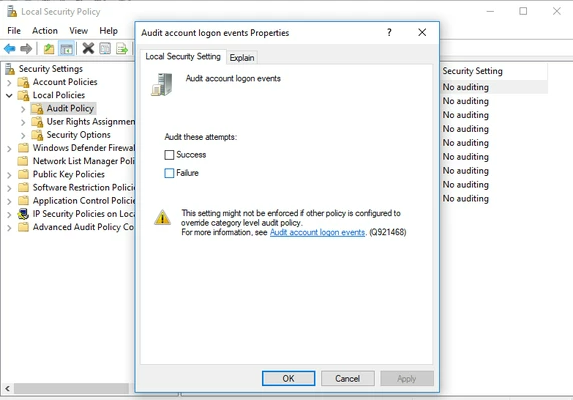
- Check "Success" and "Failures", then click "Apply"
- Repeat the same for the following:
- Audit account logon events
- Audit directory service access
- Audit object access
- Audit policy change
- Audit privilege use
- Audit system events
- Audit process tracking
Note: It is not necessary to define the policy for: Audit account management
- Open Command Prompt, once policies are enabled, and run the command gpupdate /force, to validate that the policies are enabled.
For Group Policy Management, please refer to the link below:
https://www.lepide.com/blog/audit-successful-logon-logoff-and-failed-logons-in-activedirectory/
Was this article helpful?
That’s Great!
Thank you for your feedback
Sorry! We couldn't be helpful
Thank you for your feedback
Feedback sent
We appreciate your effort and will try to fix the article