TABLE OF CONTENTS
- Overview
- Prerequisites
- Step 1: Generate Proofpoint TAP API Credentials
- Step 2: Configure in ADR
- Step 3: Validation
- Troubleshooting
Overview
This document provides the steps to integrate Proofpoint Targeted Attack Protection (TAP) with ADR/aiXDR, allowing ingestion of threat and message security data via API.
Prerequisites
Administrative access to Proofpoint TAP Dashboard
Valid Service Principal (Principal) and Secret credentials for API access
Network access from ADR CCE to Proofpoint TAP API endpoint:
https://tap-api.proofpoint.com/v2A valid CCE Host IP (or
127.0.0.1for local setup)
Step 1: Generate Proofpoint TAP API Credentials
Log in to the Proofpoint TAP Dashboard as an Administrator.
Navigate to:
Settings → Connected Applications (or API Access / Credential Management).Click on Create New Credential or Generate Credentials.
Provide a name for the new credential set (e.g.,
ARIA Integration).Click Generate to create API credentials.
The system will display two values:
Service Principal (Principal)
Secret
Copy and store both values securely, as the Secret will only be shown once.
Step 2: Configure in ADR
Login to the ADR UI with administrative credentials.
Navigate to:
Administration → Device Management → Add DeviceIn the Add Device form, fill in as follows:
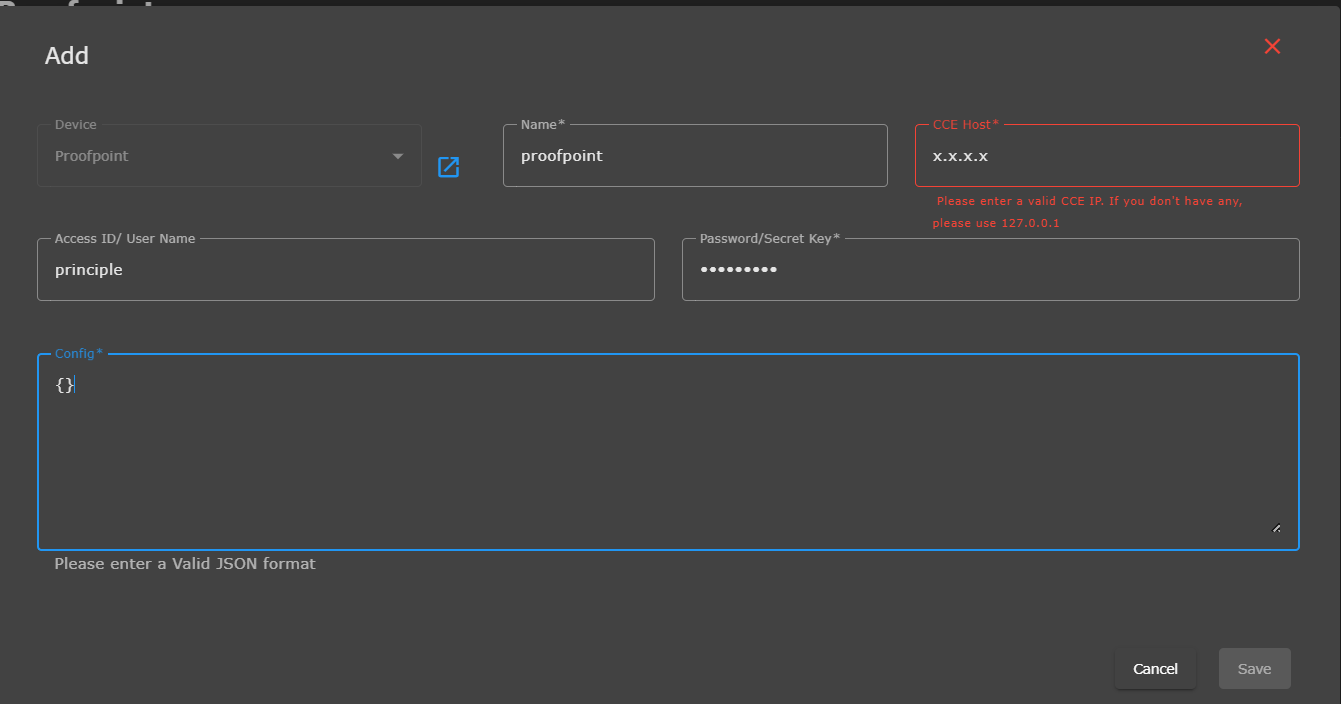
| Field | Value |
|---|---|
| Device | Proofpoint |
| Name | proofpoint |
| CCE Host | Enter valid CCE IP (e.g., 192.168.x.x) or 127.0.0.1 |
| Access ID / User Name | Enter Principal |
| Password / Secret Key | Enter Secret |
| Config | {} (empty JSON) |
Example:
{}
Click Save to complete configuration.
Step 3: Validation
Go to Device Management → confirm Proofpoint device status shows Active.
Check Logs / Threat Data section to confirm ingestion of TAP alert data.
Verify logs and indicators (malicious URLs, attachments, campaigns) under Device Type: proofpoint.
Troubleshooting
| Issue | Possible Cause | Resolution |
|---|---|---|
| Invalid JSON | Incorrect Config format | Use {} exactly |
| Authentication Error | Invalid principal/secret | Regenerate credentials in Proofpoint |
| No data received | Insufficient permissions | Ensure API credential has TAP API access scope |
| Connection failed | Incorrect CCE host or network block | Use valid CCE IP or check outbound connectivity |
Was this article helpful?
That’s Great!
Thank you for your feedback
Sorry! We couldn't be helpful
Thank you for your feedback
Feedback sent
We appreciate your effort and will try to fix the article