TABLE OF CONTENTS
Overview
We are providing the steps to integrate your FortiAnalyzer with ADR SIEM to achieve comprehensive visibility and proactive threat detection in your environment. Logs will be transferred from your firewall to the APE (Analytics and Policy Engine) via the CCE (Collection and Control Engine). This document guides you through the log forwarding configuration.
Configuration Steps
- Log in to the FortiAnalyzer.
- Navigate to System Settings → Advanced → Syslog Server.
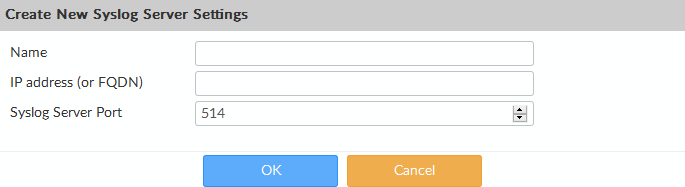
- Click Create New in the toolbar. The Create New Syslog Server Settings pane will open.
- Configure the following settings:
- Name: Enter a name for the Syslog server (e.g., ADR CCE).
- IP Address (or FQDN): Enter the IP or FQDN of the CCE Syslog server.
- Port: Enter the Syslog server port (default: 514).
- To add the Syslog server, complete the form and click OK.
- Configure local log forwarding using the CLI:
config system locallog syslogd setting
    set severity debug
    set status enable
    set syslog-name <syslog server name>
end
Verification of Configuration
Verification can be performed from either the CCE server or the GUI.
From the GUI
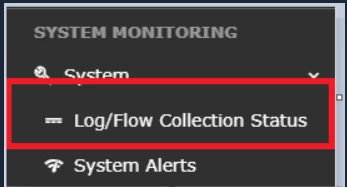
- Log in to the GUI with Administrator access and navigate to System → Log/Flow Collection Status.
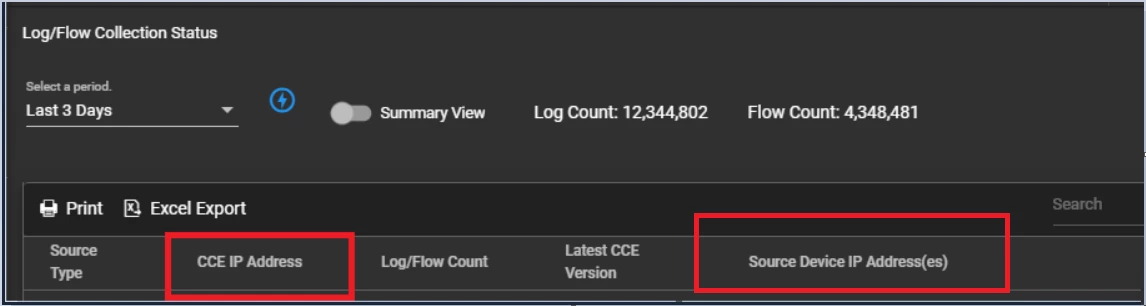
- Inside SOURCE DEVICE IP, the device IP should appear.
From the CCE Server
To verify from the CCE server, log in using your credentials and run the following command:
sudo tcpdump -i any host 514 and host <IP address> -50 -AAA
Was this article helpful?
That’s Great!
Thank you for your feedback
Sorry! We couldn't be helpful
Thank you for your feedback
Feedback sent
We appreciate your effort and will try to fix the article