TABLE OF CONTENTS
Overview
This document explains how to integrate D-Link devices with our SIEM solution.
During configuration, ensure that the CCE IP address and port 9995 are allowed through the firewall.
Steps to Enable sFlow Export
- Log in to the D-Link console.
- Enter the following command:
enable sflow - Press enter.
- Enter the command:
create sflow analyzer_server 1 owner <owner name> {timeout [ | collector port | maxdatagramsize]} - Enter the command:
create sflow counter_poller ports [ | all ] analyzer_server_id {interval [disable | ]} - Enter the command:
config sflow counter_poller ports [ | all ] interval [disable | ]
Example for D-Link
>> enable sflow
>> create sflow analyzer_server 1 owner MENFA {timeout infinite collector address <192.16.18.2>192.16.18.2 is the NFA server IP.
>> collector port <9995>
9995 is the sFlow listener port. The datagram size defaults to 1400.
>> create sflow flow_sampler ports all analyzer_server_id 1 rate 20
Here, the actual rate is the configured rate multiplied by 256.
For example, if the rate is 20, the actual rate is 5120.
>> create sflow counter_poller ports all analyzer_server_id 1 interval 60
Verification
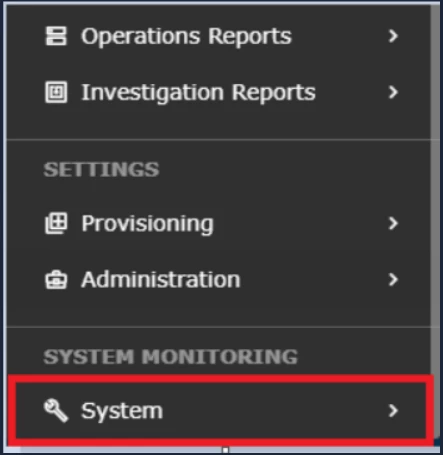
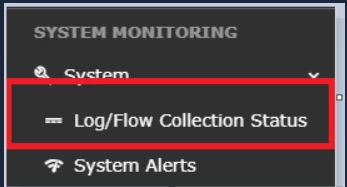
- Log in to UI → SYSTEM → LOGS AND FLOWS COLLECTION STATUS.
- Open LOGS/FLOW COLLECTION STATUS.
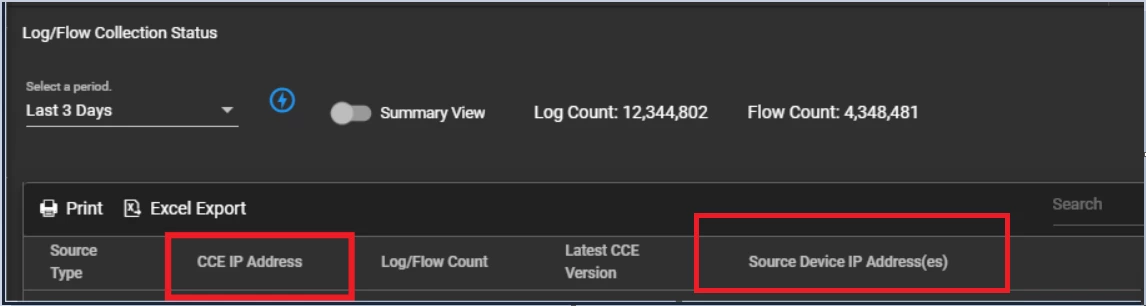
- Inside SOURCE DEVICE IP, the device IP should be visible.
Was this article helpful?
That’s Great!
Thank you for your feedback
Sorry! We couldn't be helpful
Thank you for your feedback
Feedback sent
We appreciate your effort and will try to fix the article