TABLE OF CONTENTS
Overview
Forcepoint Web Protection Solutions allow Internet activity logging data and, as of v8.5.4, audit log data to be passed to a third-party SIEM product, like ADR AI SIEM.
Use web protection reporting tools or SIEM integration to report on Internet activity when alerts reveal a potential issue.
Forcepoint Proxy Configuration
- Log in to the Forcepoint Proxy server.
- Navigate through SETTINGS > GENERAL > SIEM INTEGRATION to activate.
- Provide the <CCE IP address> or Hostname of the machine hosting the SIEM product, then further provide the communication Port(514) to use for sending SIEM data.
- Specify the transport Protocol (TCP/UDP) to use when sending data to the SIEM product.
- Click OK to cache your data. Changes are not implemented until you click on Save and Deploy (THIS OPTION IS ON THE RIGHT SIDE, TOP).
Verification
Verification can be done either from the GUI or from the CCE server.
Using the GUI
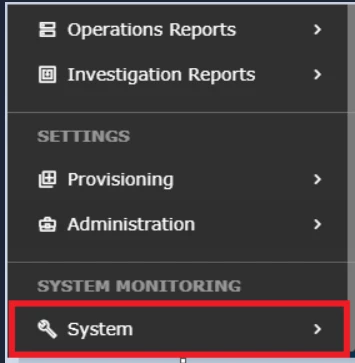
- Log in to the UI and hover over System.
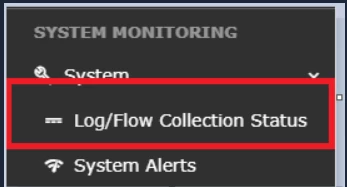
- Go to Log/Flow Collection Status.
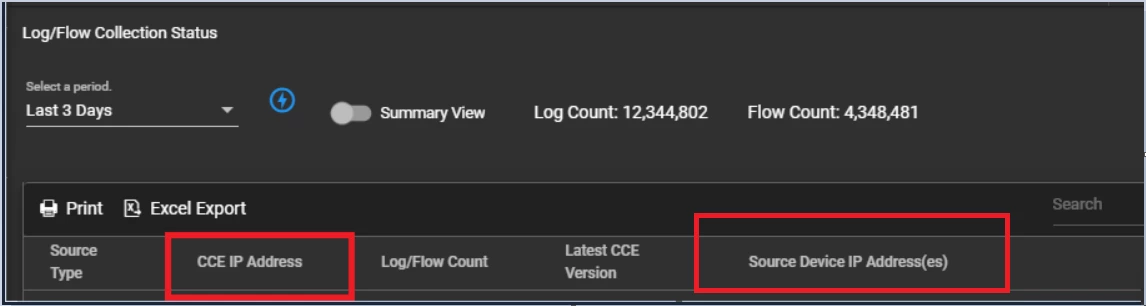
- Inside the Source Device IP, confirm the expected IP address is displayed.
Using the CCE SERVER
Log in to the CCE Server with the seceon user and execute the following command.
sudo tcpdump -i any host 514 and host -AAA
Was this article helpful?
That’s Great!
Thank you for your feedback
Sorry! We couldn't be helpful
Thank you for your feedback
Feedback sent
We appreciate your effort and will try to fix the article