Table of Contents
- Overview
- Prerequisites
- Enable Syslog Forwarding in Thycotic PAM
- In the Thycotic configuration interface, locate Syslog Settings
- Configure Event Categories
- Verification (MSSP Only)
Overview
This knowledge base article provides step-by-step instructions for configuring syslog forwarding from Thycotic Privileged Access Management (PAM) to ADR Control and Collection Engine (CCE) Server. This integration enables centralized security event monitoring and analysis by forwarding Thycotic PAM audit logs, authentication events, and administrative activities to your ADR SIEM platform.
Thycotic PAM generates valuable security events, including privilege escalations, password retrievals, session recordings, and policy violations. By forwarding these logs to ADR CCE, organizations can:
- Centralise privileged access monitoring and alerting
- Correlate PAM events with other security data sources
- Meet compliance requirements for privileged access auditing
- Enable automated threat detection and response workflows
Prerequisites
Before configuring syslog forwarding, ensure the following requirements are met:
Thycotic PAM Requirements
- Thycotic Secret Server version 10.9 or later
- Administrative access to Thycotic Secret Server
- Network connectivity from the Thycotic PAM server to the ADR CCE
- Appropriate licensing for audit and logging features
ADR CCE Requirements
- ADR CCE Server is properly installed and configured
- Network accessibility on the designated syslog port (typically UDP 514 or custom port)
- Sufficient storage capacity for incoming Thycotic PAM logs
- Appropriate user permissions to configure log sources
Network Requirements
- Firewall rules allowing UDP traffic from the Thycotic PAM server to ADR CCE on the syslog port
- DNS resolution between systems (if using hostnames instead of IP addresses)
- Network latency under 100ms for optimal performance
Information Required
- ADR CCE Server IP address or hostname
- Syslog port number (default: 514)
- Syslog facility and severity levels to be used
- Authentication credentials for both systems
Enable Syslog Forwarding in Thycotic PAM
In the Thycotic configuration interface, locate Syslog Settings
- Enable syslog forwarding by checking Enable Syslog Export
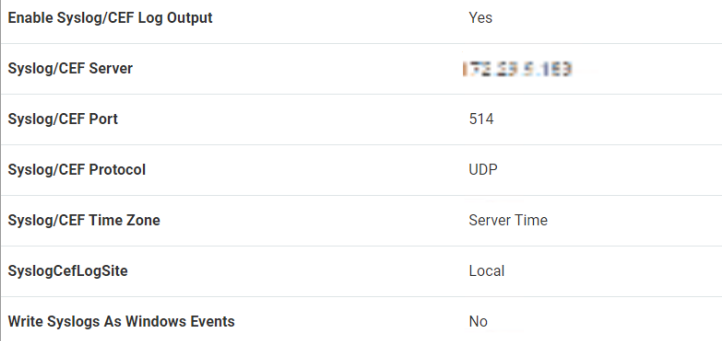
- Configure the following syslog parameters:
- Syslog Server: Enter the ADR CCE server IP address or hostname
- Port: Enter the port number configured on ADR CCE (typically 514)
- Protocol: Select
UDP(recommended) orTCPbased on your network requirements - Facility: Select
Local0throughLocal7orUser(coordinate with ADR CCE configuration) - Severity Level: Select
InformationalorDebugfor comprehensive logging
Configure Event Categories
- In the syslog configuration section, select which event categories to forward:
- Authentication Events: Login attempts, failures, lockouts
- Secret Access: Password retrievals, secret views, downloads
- Administrative Actions: User management, policy changes, system configuration
- Session Activity: Remote session connections, disconnections
- System Events: Service starts/stops, system errors, warnings
- Audit Trail: All auditable events for compliance
- For comprehensive monitoring, it is recommended to enable all event categories
- Configure event filtering if needed to reduce log volume
Verification (MSSP Only)
From the ADR CCE Server
- Log in as a ADR user and execute the below command
sudo tcpdump -i any port 514 and host -s0 -AAA
From the ADR GUI Console
- Login to UI >System>Logs Flow Collection Screen
- Inside the Source Device IP column, the PAM IP will be reflected.
Was this article helpful?
That’s Great!
Thank you for your feedback
Sorry! We couldn't be helpful
Thank you for your feedback
Feedback sent
We appreciate your effort and will try to fix the article