Table of Contents
Overview
The BeyondTrust B Series Appliance (formerly Bomgar) can generate syslog messages from its /login and /appliance interfaces, as well as from connected clients (e.g., Representative Console).
Integrating BeyondTrust with ADR enables centralized visibility of authentication events, administrative actions, and appliance activity. These logs can be forwarded from the BeyondTrust appliance to the CCE (Collection and Control Engine) for ingestion, normalization, and security analysis.
BeyondTrust syslog messages cover a wide range of events, including:
Authentication attempts (successful/failed logins).
Administrative and system changes.
Session and connection events.
Appliance health and security notifications.
Prerequisites
Before configuring integration, ensure:
Administrative access to the BeyondTrust B Series Appliance web interface (
/appliance).Network connectivity from BeyondTrust → ADR CCE (UDP 514 by default, or TCP 6514 for TLS).
Proper firewall rules allowing syslog traffic.
Administrator email configured at:
Security → Email Configuration → Security → Admin Contact (used for syslog alerts).
Configuration Steps
Log in to the BeyondTrust B Series Appliance Admin Interface:
Navigate to:
Security → Appliance Administration → Syslog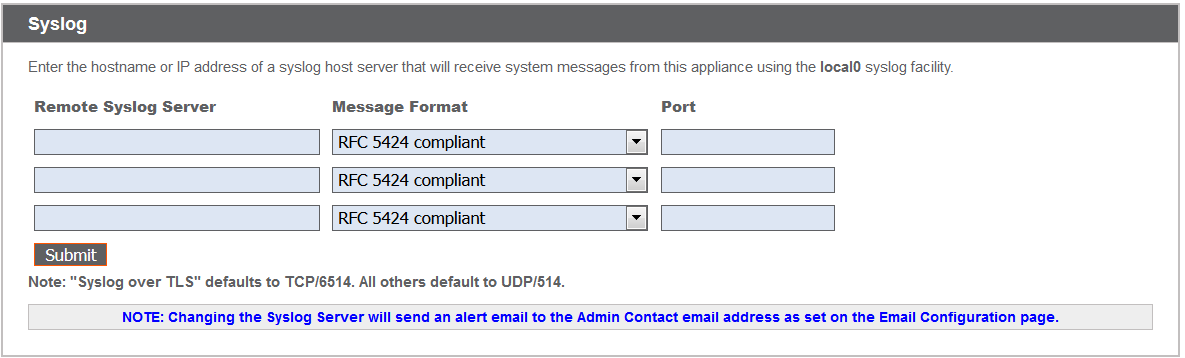
Configure syslog forwarding:
Remote Syslog Server: Enter the CCE IP/hostname.
Number of Servers: You may configure up to three remote syslog servers.
Message Format: Select one of the following:
RFC 5424(recommended modern standard).BSD (legacy)formats.Syslog over TLS(secure option, defaults to TCP 6514).
Protocol & Ports:
Default UDP 514 for standard syslog.
Default TCP 6514 for Syslog over TLS (can be changed).
Facility: BeyondTrust logs use the
local0facility.
Save and apply changes.
⚠️ Note: When you add or change a syslog server configuration, an alert is automatically emailed to the administrator.
Verification (MSSP Only)
1. From ADR dashboard
Log in to the ADR console.
Navigate: System → Logs and Flows Collection Status.
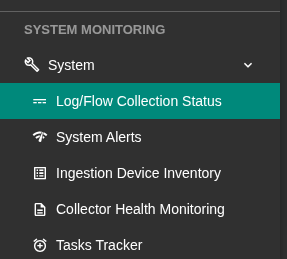
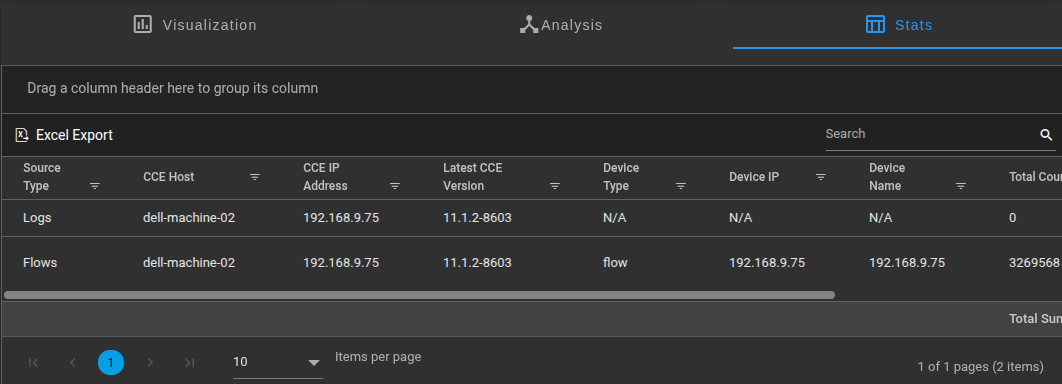
Confirm that the BeyondTrust appliance IP appears as a log source.
2. From CCE (CLI)
SSH into the CCE server.
Run the following command to check if logs are being received:
sudo tcpdump -i any port 514 and host <BeyondTrust_IP> -s0 -vvvReplace
<BeyondTrust_IP>with the actual BeyondTrust appliance IP.Verify that syslog events are captured.
Was this article helpful?
That’s Great!
Thank you for your feedback
Sorry! We couldn't be helpful
Thank you for your feedback
Feedback sent
We appreciate your effort and will try to fix the article