TABLE OF CONTENTS
Overview
Plexxi switches are designed for high-performance, fabric-based networking. To provide centralized visibility and proactive security monitoring, Plexxi switches support sFlow, which allows packet sampling and flow export to an external collector.
In this integration, the Plexxi switch forwards sFlow data to the ADR Control and Collection Engine (CCE), where it is processed and analyzed by the Analytics and Policy Engine (APE) for real-time traffic monitoring, anomaly detection, and threat analysis.
Prerequisites
Before configuration, ensure:
Plexxi switch with CLI access.
Administrative credentials for the switch.
ADR CCE IP address (e.g.,
192.168.10.12).UDP port 6343 open between Plexxi and CCE.
Knowledge of which interfaces to monitor.
Configuration Roadmap
Log in to the Plexxi switch CLI.
Configure sFlow agent (management IP).
Configure sFlow collector (CCE IP, UDP/6343).
Enable ingress/egress sampling on interfaces.
Verify that flows are being exported successfully.
Configuration Steps
Step 1: Log in to Plexxi Switch CLI
login as: admin
admin@192.168.10.170's password: ********
Plexxi Switch version 2.1.2-rc2
*plexxi> en
Step 2: Configure sFlow Agent and Collector
Set the agent IP and direct sFlow traffic to the ADR CCE server (192.168.10.12 in this example).
*plexxi(config)# sflow agent-ip 192.168.10.170
*plexxi(config)# sflow collector-ip 192.168.10.12 port 6343
Step 3: Apply Sampling on Interfaces
Enable sFlow sampling on interfaces where traffic visibility is required:
*plexxi(config)# interface ethernet 1/1
*plexxi(config-if)# sflow enable
*plexxi(config-if)# sflow sampling-rate 1024
*plexxi(config-if)# exit
Repeat for all relevant interfaces. Adjust the sampling rate (default 1024) as per traffic volume.
Verification (MSSP Only)
On Plexxi Switch
Run the following to confirm collector configuration and sampling:
*plexxi# show sflowVerify agent IP, collector IP/port, and sampling details.
On ADR CCE (Command-Line)
Run tcpdump on the CCE server to check sFlow packets:
sudo tcpdump -i any port 6343 and host <Switch_IP> -s0 -AAAReplace <Switch_IP> with the Plexxi switch management IP.
On ADR UI
Log in to ADR SIEM UI.
Navigate: System → Logs and Flows Collection Status.
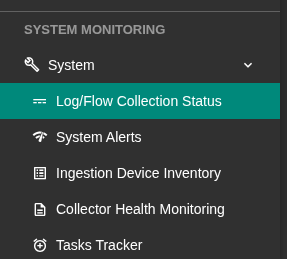
Verify that the Plexxi switch IP appears under Source Device IP.
Was this article helpful?
That’s Great!
Thank you for your feedback
Sorry! We couldn't be helpful
Thank you for your feedback
Feedback sent
We appreciate your effort and will try to fix the article