TABLE OF CONTENTS
Overview
Dell Switches can be integrated with ADR using sFlow forwarding, allowing centralized collection and monitoring of network traffic data. Once configured, flow logs are transferred from the switch to the ADR Collection and Control Engine (CCE), which then forwards them to the Analytics and Policy Engine (APE) for analysis.
This integration provides comprehensive visibility into network activity and enables proactive threat detection within your environment.
Prerequisites
Before starting configuration, ensure the following:
Administrative access to the Dell Switch CLI.
Connectivity between the Dell Switch and the CCE server.
Port 6343/UDP is allowed through any firewalls.
CCE server IP address is known.
Configuration Steps
Enter Privileged Mode.
console> enableEnter Configuration Mode.
console# configureSet sFlow Destination
console(config)# sflow 1 destination <CCE_IP> 6343- <CCE_IP>→ Replace with the IP address of the ADR CCE server.- 6343→ Default UDP port for sFlow.Set Owner and Timeout
console(config)# sflow 1 destination owner SFLOW_EXAMPLE timeout 10000- owner→ Descriptive string (e.g., SFLOW_EXAMPLE).- timeout→ Validity in seconds (0disables receiver).Enable Polling on Interfaces
console(config)# sflow 1 polling gi1/0/1-4 30- Polls every
30seconds.- Replace
gi1/0/1-4with interface or range.Enable Sampling on Interfaces
console(config)# sflow 1 sampling gi1/0/1-4 1024- Sampling rate: 1 out of 1024 packets.
Sample Configuration
console> enable
console# configure
console(config)# sflow 1 destination 192.168.2.1 6343
console(config)# sflow 1 destination owner SFLOW_EXAMPLE timeout 10000
console(config)# sflow 1 polling gi1/0/1-4 30
console(config)# sflow 1 sampling gi1/0/1-4 1024
Verification (MSSP Only)
From Switch CLI
Check Destination Configuration
console# show sflow 1 destinationExpected output includes:
Receiver Index
Owner String
Timeout
Destination IP & Port (6343)
Datagram Version (5)
Check Polling
console# show sflow 1 pollingCheck Sampling
console# show sflow 1 samplingFrom ADR UI
Log in to the ADR UI.
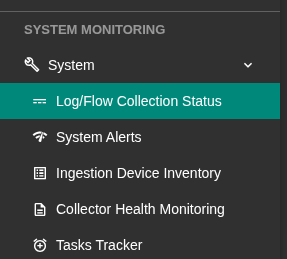
Navigate to: System > Logs and Flows Collection Status.
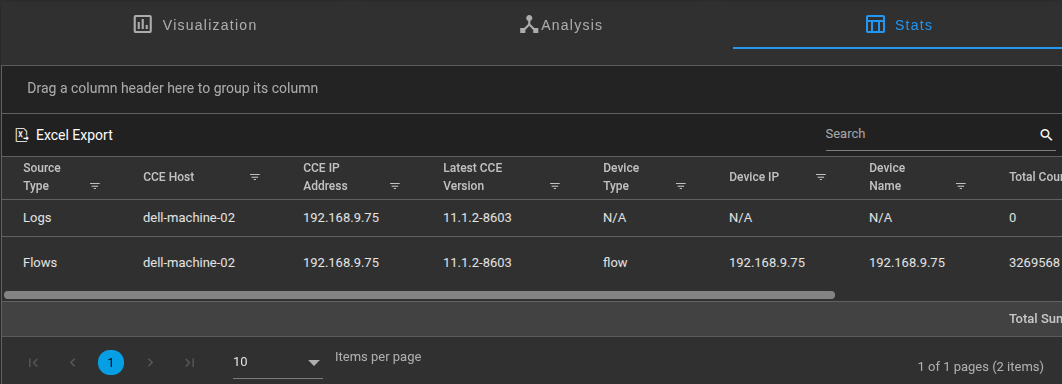
Confirm that the Dell Switch Source Device IP is listed.
From CCE Server
Run tcpdump on the CCE server to confirm flow reception:
sudo tcpdump -i any port 6343 and host <Switch_IP>Replace
<Switch_IP>with the Dell switch management IP.If packets are visible, logs are successfully being forwarded.
Was this article helpful?
That’s Great!
Thank you for your feedback
Sorry! We couldn't be helpful
Thank you for your feedback
Feedback sent
We appreciate your effort and will try to fix the article