Summary
After the file scan completes, the driver fails to start and reports error 1359. The root cause is a corrupted Windows registry value:
HKLM\SYSTEM\CurrentControlSet\Control\Windows\SystemDirectory
On the affected system, this value was incorrectly set to:
C:\Windows\SysWOW64
Impact
Driver fails to start.
Root Cause
The SystemDirectory registry value must point to the 64 bit system directory %SystemRoot%\System32
Resolution
- Correct the registry value at:
HKLM\SYSTEM\CurrentControlSet\Control\Windows\SystemDirectory - Set the value to: %SystemRoot%\system32
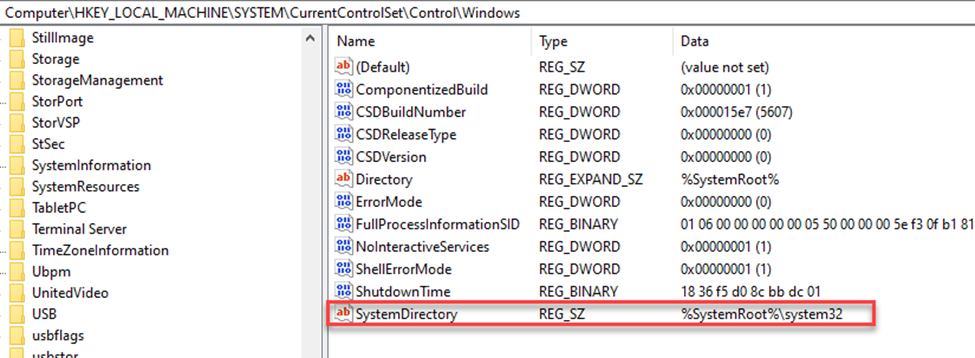
- Reboot the system.
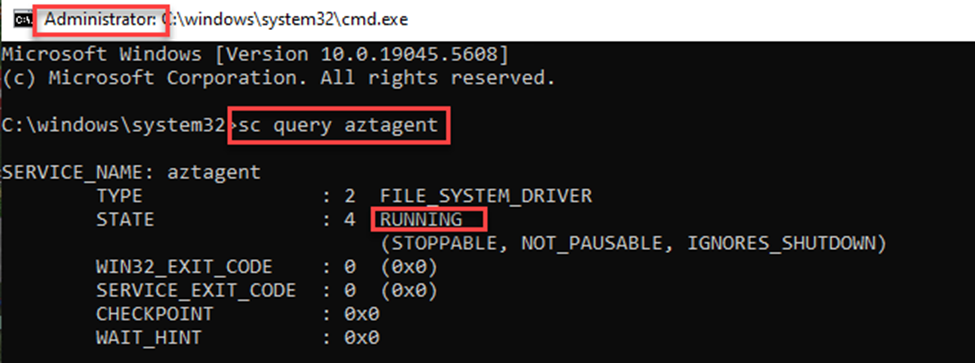
- Verify the driver started by opening a command prompt and executing the command ‘sc query aztagent’
Was this article helpful?
That’s Great!
Thank you for your feedback
Sorry! We couldn't be helpful
Thank you for your feedback
Feedback sent
We appreciate your effort and will try to fix the article